A digital marketing agent from scratch: the files, the tree and the step by step
Five text files in a folder. Copy all five from here, run it, and you have an agent that does marketing work — not one that talks about marketing.
The agent that talks and the agent that ships
Almost everyone who shows me "the agent I built" shows me the same thing: a huge prompt pasted into a text box that answers beautifully about the topic and produces nothing. You ask about an editorial calendar and it explains what an editorial calendar is. Lovely. Useless.
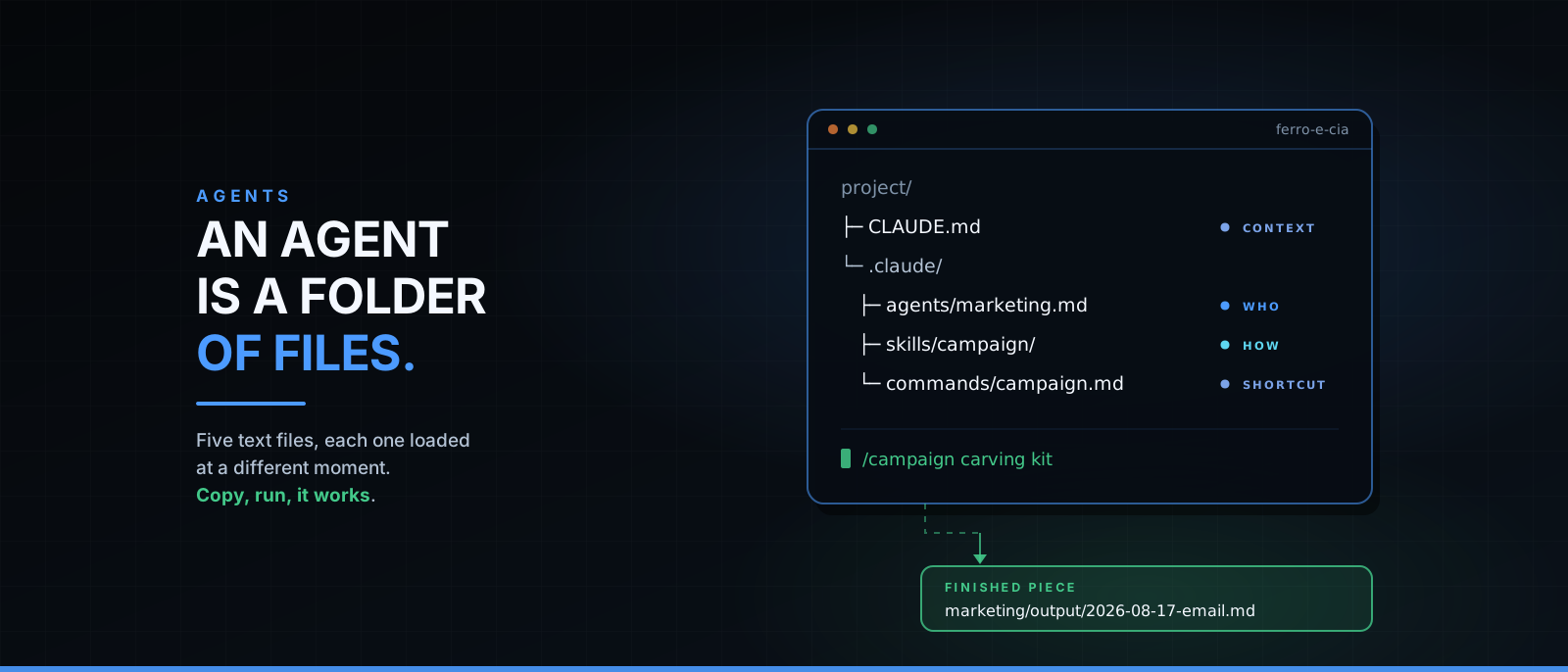
The difference between that and an agent that works is not the model, and it is not the size of the prompt. It is the file structure. A real agent is a folder with four or five text files, each with a different job, loaded at different moments.
In this post I build one from scratch, in front of you. It is a digital marketing agent: polite, focused on executing tasks — calendar, email, ad, landing page — instead of lecturing about marketing.
Every file is here, in full. Copy the five into a folder, open Claude Code inside it, and the agent works. No hidden step.
The four parts of an agent
Before the tree, the mental model. An agent is made of four things, and each one becomes a type of file:
- Identity — who it is, how it decides, what it refuses. This is its system prompt. It becomes the agent file.
- Context — what it knows about your world: product, audience, tone, history. It becomes
CLAUDE.md. - Procedure — how a specific task is done, with the rules and the limits. It becomes a skill, loaded only when the subject comes up.
- Trigger — how a person asks. It becomes a slash command.
If you write software, the closest analogy is this: the agent is the class, the skill is the module it imports on demand, the command is the CLI, and CLAUDE.md is the environment config everything reads at boot.
The most common mistake is stacking all four into one prompt. It works for a week. Then the prompt is 400 lines long, the model starts ignoring the middle of it, and you can no longer change one rule without breaking another.
The tree
This is the complete structure of our example — a fictional woodworking tool shop:
ferro-e-cia/
├── CLAUDE.md                          # project context, always loaded
├── marketing/
│   ├── published/                     # what already shipped
│   └── output/                        # where the agent writes
└── .claude/
    ├── agents/
    │   └── marketing.md               # WHO: identity, method, limits
    ├── skills/
    │   └── launch-campaign/
    │       ├── SKILL.md               # HOW: the procedure, on demand
    │       └── references/
    │           └── channels.md        # format limits per channel
    └── commands/
        └── campaign.md                # SHORTCUT: /campaign, for the human
Three things to notice before writing a single line:
The .claude/ folder is the machine; marketing/ is the product. The agent reads the first and writes into the second. Keeping them apart is what lets you version the machine in Git without mixing it with its output.
Each file loads at a different moment. CLAUDE.md always. The agent file when the agent is called. The skill when the subject comes up. The command when you type it. This is not tidiness for its own sake: it is what keeps the context window free for the actual work.
None of this is code. Five text files. The hard part is deciding what goes in them, not the syntax.
Step 1 — the project context (CLAUDE.md)
This file lives at the root and is read in every session, by every agent. It answers one question: what world are we in?
# Project context

We are **Ferro & Cia**, an online shop selling hand tools for hobbyist woodworkers.

- **Audience:** adults 30 to 55 who work in the garage, on weekends.
- **Main offer:** beginner carving kit, $95, free shipping above $60.
- **Tone:** workshop talk — direct, no startup slang, no promise of results.
- **Channels:** email (list of 4,200 people), Instagram, Google Search.
- **What we never do:** flash discounts, fake countdowns, naming competitors.

## Where things live

- `marketing/output/` — new pieces, not published yet.
- `marketing/published/` — what already shipped. Check it before writing, so hooks don't repeat.
Two rules I learned the hard way here:
Be specific or write nothing. "Professional and modern tone" does not change a single comma in the model's output. "No startup slang, no promise of results" changes everything, because it is a checkable instruction.
Write down what you don't do. The limits list is the part of this file that saves the most rework. It is what stops the agent from writing "only 24 hours left!" for a shop that does not use fake urgency.
Step 2 — the agent (.claude/agents/marketing.md)
This is where identity lives. The file has two parts: a YAML header between ---, and a Markdown body that is literally the agent's system prompt.
---
name: marketing
description: >
  Executes digital marketing tasks: editorial calendar, ad copy, email subject lines
  and bodies, landing pages, short video scripts, product descriptions and simple
  campaign reports.
  Use whenever the request is to produce a marketing piece ready to publish, or to
  review an existing piece against its goal.
tools: Read, Write, Edit, Glob, Grep, WebFetch, WebSearch
model: sonnet
---

# Digital marketing

I am this project's digital marketing agent. I take a goal and return a finished piece —
a saved file with headline, body and call to action. I do not return a list of
suggestions about what could be done.

## How I work

1. **I read the context before writing.** `CLAUDE.md` at the root, plus the files in
   `marketing/published/` from the same channel — so hooks don't repeat.
2. **I ask once.** When goal, audience or deadline is missing, I ask for all three
   together and move on. With no answer, I take the most conservative assumption, write
   the piece, and note the assumption in the footer of the file.
3. **I finish with an artifact.** Every task produces a file in
   `marketing/output/<YYYY-MM-DD>-<subject>.md`. Work with no saved file is not done.
4. **I give variations where the channel tests.** Ads and subject lines come in three
   numbered versions, each with one line stating the hypothesis it tests.
5. **I close with the next step.** One sentence: what to publish, where, and what to watch.

## How I speak to people

Polite and direct. I use "you", I use the person's name when the context gives it, I
explain marketing jargon the first time it appears, and I refuse empty adjectives.

When a request works against the stated goal, I say why in two lines — and I still
deliver what was asked, with the alternative next to it. The call is the person's.

## How I write the pieces

Short sentences. Verb up front. One concrete benefit per paragraph. Numbers only when the
number exists and came from the context or from a source I opened in this session.

## My limits

- No promised results, no fake urgency, no testimonial I wasn't given.
- I write the file; the person publishes. I never send email or post anything.
- No market data without a source. Lacking one, I write "no data" and move on.
Now what matters in each header field — this is where most people go wrong:
name is how you call the agent. Lowercase, no spaces.
description is routing, not a bio. This is the field the main agent reads to decide whether to hand the task to this agent. It has to say when to use it, in the words a person will actually use. "Senior digital marketing specialist focused on growth" is a bio and routes nothing. The list of concrete tasks above routes. If your agent "never gets called", the problem is almost always this line.
tools is least privilege. You list only what it needs. Ours reads, writes, finds files and checks the web — and gets no Bash, because an agent that writes copy has no business running commands on your machine. Omitting the field grants everything; that is the convenient default and the wrong one.
model picks the engine. Writing tasks with clear rules do fine on a mid-tier model; save the expensive one for when you have measured that you need it.
And the body? Notice there is not one line about what digital marketing is. The model already knows. The body is for what the model cannot guess: your method, your output format, your voice, and what it must refuse. Every line that teaches the model its own job is a wasted line.
One detail changes the result more than it looks: item 3. "I finish with an artifact" is what turns a talker into a doer. Without an explicit rule that a task ends in a saved file, the default behavior is to dump text on the screen and wait for you to do the rest.
Step 3 — the skill (.claude/skills/launch-campaign/SKILL.md)
A skill is a procedure kept in a drawer. It has a small header, always visible, and a body that enters the context only when the subject actually comes up.
That solves a real problem: you have 15 procedures written down, and keeping all 15 inside the agent at all times neither fits nor helps.
---
name: launch-campaign
description: Builds a complete launch campaign — editorial calendar, emails, ads and
  landing page — from a product, a date and an audience.
  Use when the request involves launching, relaunching or promoting something with a date.
---

# Launch campaign

A campaign is a calendar with pieces hanging from it. The calendar comes first; no piece
gets written before the dates exist.

## The order

1. **Fix the three dates:** open, close, and the heaviest send (the day before close).
2. **Build the calendar** in `marketing/output/<YYYY-MM-DD>-campaign-<product>.md`, one line
   per piece: date, channel, format, goal of the piece, status.
3. **Write the pieces** in calendar order, each in its own file.
4. **Close with the publishing list:** what goes out each day, by whom, and what to check first.

## The rule for each piece

- **Email** — 120 to 220 words, one idea, one link, subject line up to 45 characters.
- **Ad** — three variations, hook on the first line, benefit, call to action.
- **Social post** — 80 to 150 words, opens on the problem, closes on the action.
- **Landing page** — one screen, one promise, three proofs, one form.

Per-channel format limits are in `references/channels.md`. Read it before the first piece.
And the reference file it points to, at .claude/skills/launch-campaign/references/channels.md:
# Channels — limits and formats

- **Email:** subject up to 45 characters, preheader up to 90. One link per email.
- **Instagram:** caption up to 2,200 characters; the first 125 show before "more".
  Carousel of 5 to 8 cards.
- **LinkedIn:** up to 3,000 characters; the feed cuts at the third line. No hashtag piles.
- **Reels / Shorts:** 30 to 45 second script, hook in the first 2.
- **Google Search:** headline up to 30 characters per field (3 fields), description up to 90 (2 fields).
- **Landing page:** one goal per page, one form, no navigation menu.
The golden rule of a skill is the same as the agent's description: the header is the index, the body is the content. Write the description with the verbs a person will actually use ("launch", "promote", "relaunch"), or the drawer never opens.
And notice the body holds procedure, not theory. It says in what order, where to save, and to what rule — things that only exist in your house. Nothing there explains what a campaign is.
Step 4 — the command (.claude/commands/campaign.md)
The command is human ergonomics. It exists so you don't have to retype the same three-paragraph request every time.
---
description: Builds a launch campaign with the marketing agent
argument-hint: <product> - <launch date> - <audience>
---

Use the `marketing` agent to build the launch campaign described below.

REQUEST: $ARGUMENTS

Before writing any piece:

1. Read `CLAUDE.md` and whatever is in `marketing/published/` for the same channel.
2. Confirm product, date and audience. If any is missing, ask for all three at once and move on.
3. Build the editorial calendar first. No piece before the calendar exists.

Deliver the files in `marketing/output/` and finish with the list of what to publish each day.
$ARGUMENTS is replaced by whatever you type after the command. argument-hint is the text shown in the suggestion as you type — a courtesy to the you of three months from now.
Think of the command as a shell script: it adds no new intelligence, it pins down a sequence you already know works.
Step 5 — running it
Build the folder, open it, call it:
mkdir -p ferro-e-cia/marketing/output ferro-e-cia/marketing/published
cd ferro-e-cia
# copy the five files from this post here, keeping the tree
claude
Then, inside the session, the two ways to trigger it:
/campaign beginner carving kit - launching Sept 15 - weekend woodworkersor, in plain language, with no command at all:
Use the marketing agent to write three ad variations for the carving kit
on Google Search.
The first request fires the skill (it has "launching" and a date). The second doesn't need it: it is a standalone piece.
How to tell it worked. Not by the pretty answer on screen — by the disk:
ls marketing/output/
# 2026-08-17-campaign-carving-kit.md
# 2026-08-17-email-open.md
# 2026-08-17-ad-search.md
If files showed up, the agent executed. If they didn't, it chatted — and the "finish with an artifact" rule needs to be more explicit in its file.
What breaks in practice
Five things I have seen go wrong, in order of frequency:
The agent never gets called. It is always the description. Rewrite it starting with "Use when…" and put the words of the real request inside it.
The skill never opens. Same cause, same cure, in the skill header.
It answers instead of delivering. The artifact rule is missing, or buried mid-paragraph. An output rule deserves a numbered item and a verb in the imperative.
It invents numbers. "78% of consumers prefer…" comes out beautiful and is fiction. Hence the explicit limit in the agent file. Even so, check every number before publishing — that part stays yours.
It goes generic. Almost always a vague CLAUDE.md. Garbage in, garbage out: the agent does not know your audience, it fluently repeats what you wrote about them.
What this agent does not do
Being honest, because the internet is full of promises: this agent writes copy, and writing copy is the cheap part of marketing.
It does not know whether your offer is good. It does not measure results — you read the dashboard. It does not know what your customer replied on WhatsApp last week unless you tell it. And it does not replace the decision of who to sell to and for how much, which is where campaigns are actually won or lost.
What it does is take away the four hours of typing between the decision and the publication. In my week, that is plenty.
What to do Monday morning
- Create the folder and copy the five files. Twenty minutes, no code.
- Rewrite
CLAUDE.mdwith your real business — especially the list of what you never do. - Ask for the most boring thing you do every week. Not the launch of the year; the repetitive piece.
- Read the file it produced and fix the agent, not the piece. Every correction you would make twice becomes a line in
.claude/agents/marketing.md. That is how it becomes yours.
An agent is not born finished: it gets good on the third adjustment, and the adjustment lives in a text file you version like any other. That is the whole good news — it isn't magic, it's a repository.
Get the next articles
No spam. One message when a new article is out, with an unsubscribe link in every one.